Online scams and hacking attempts are increasing every day, and messaging apps are often the first target. To deal with this growing risk, WhatsApp is rolling out a new security feature designed for users who need extra protection. The setting is called Strict Account Settings, and it can significantly reduce your exposure to cyber threats.
This feature is especially useful if you receive messages from unknown numbers or worry about malicious links, fake calls, or spyware attacks.
What Is WhatsApp Strict Account Settings?
Strict Account Settings is a new advanced privacy option on WhatsApp. It is made for users who may be at higher risk of cyberattacks, such as journalists, activists, public figures, or anyone dealing with sensitive information.
Once enabled, this setting locks down several parts of your account and limits how unknown contacts can interact with you.
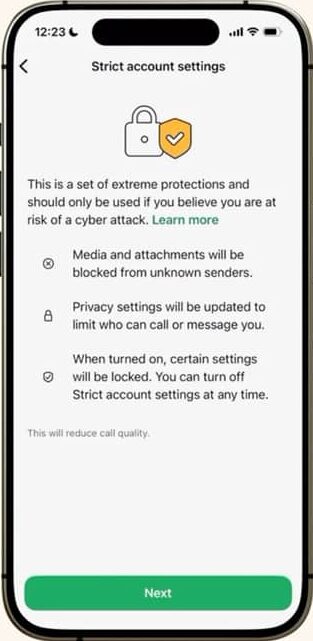
How Strict Account Settings Works
When you turn on this feature, WhatsApp automatically applies multiple security restrictions at once. These changes help block common attack methods used by scammers and hackers.
Key Protections Included
| Security Feature | What It Does |
|---|---|
| Block media from unknown senders | Stops automatic downloads of files that may contain malware |
| Silence calls from unknown numbers | Prevents scam calls and call-based hacking attempts |
| Disable link previews | Reduces risk from malicious links |
| Restrict group additions | Only approved contacts can add you to groups |
| Hide profile details | Non-contacts cannot see your photo, about info, or online status |
These protections work together to reduce unwanted contact and limit attack surfaces.
Who Should Use This Feature?
WhatsApp clearly states that most users may not need Strict Account Settings. However, it is recommended if:
- You frequently receive messages from unknown numbers
- You handle sensitive or confidential information
- You are concerned about phishing, spyware, or hacking
- You want maximum privacy with minimal interaction from strangers
If you prefer strong privacy over convenience, this feature is worth enabling.
How to Enable Strict Account Settings on WhatsApp
Turning on this setting is simple, but it can only be done from your main phone.
Steps to Enable
- Open WhatsApp
- Go to Settings
- Tap Privacy
- Select Advanced
- Turn on Strict Account Settings
Important to note:
- This option cannot be enabled through WhatsApp Web
- It must be activated from your primary device
The feature is rolling out gradually, so it may not appear for everyone immediately.
Why WhatsApp Is Focusing on Security Now
WhatsApp already uses end-to-end encryption, which means only you and the recipient can read messages. However, past incidents showed that encryption alone is not always enough.
In previous years, spyware tools like Pegasus, developed by NSO Group, targeted users through WhatsApp calls. These attacks affected journalists and civil society members worldwide.
After these incidents:
- Meta sued NSO Group and won $167.25 million in damages
- WhatsApp shut down multiple spyware campaigns
- New advanced protections were developed, including Strict Account Settings
This feature is part of WhatsApp’s effort to stay ahead of sophisticated cyber threats.
Ongoing Privacy Concerns and Lawsuits
Meta is currently facing a lawsuit claiming that WhatsApp and Meta can access private messages. The company strongly denies this.
According to Meta’s communications head, WhatsApp uses the Signal encryption protocol, which technically prevents the company from reading user messages. Meta has dismissed the lawsuit as baseless.
FAQs
Is Strict Account Settings available for everyone?
It is rolling out gradually over the coming weeks. Not all users will see it immediately.
Will this affect my chats with saved contacts?
No. Your regular chats, calls, and media sharing with saved contacts will work normally.
Can I turn it off later?
Yes. You can disable Strict Account Settings at any time from the Privacy menu.
Does this replace end-to-end encryption?
No. End-to-end encryption remains active. This feature adds extra layers of protection.
Will this stop all scams?
No feature can stop all threats, but this setting greatly reduces common scam methods.
Conclusion
Scammers and hackers are becoming smarter, and basic privacy settings are no longer enough for everyone. WhatsApp’s new Strict Account Settings offers a simple way to add strong security without installing extra apps or tools.
If you value privacy, receive messages from unknown numbers, or want better protection against cyber threats, turning on this setting is a smart move. It takes less than a minute and can save you from serious trouble later.
In a digital world full of risks, a small setting change can make a big difference.

Rana Shahriyar is a dedicated content writer and contributor at 8171 Rashan Program. With a strong interest in social welfare programs and government initiatives, his work focuses on delivering clear, reliable, and easy to understand information for the public.